
Реклама

Код товара: 2374764317


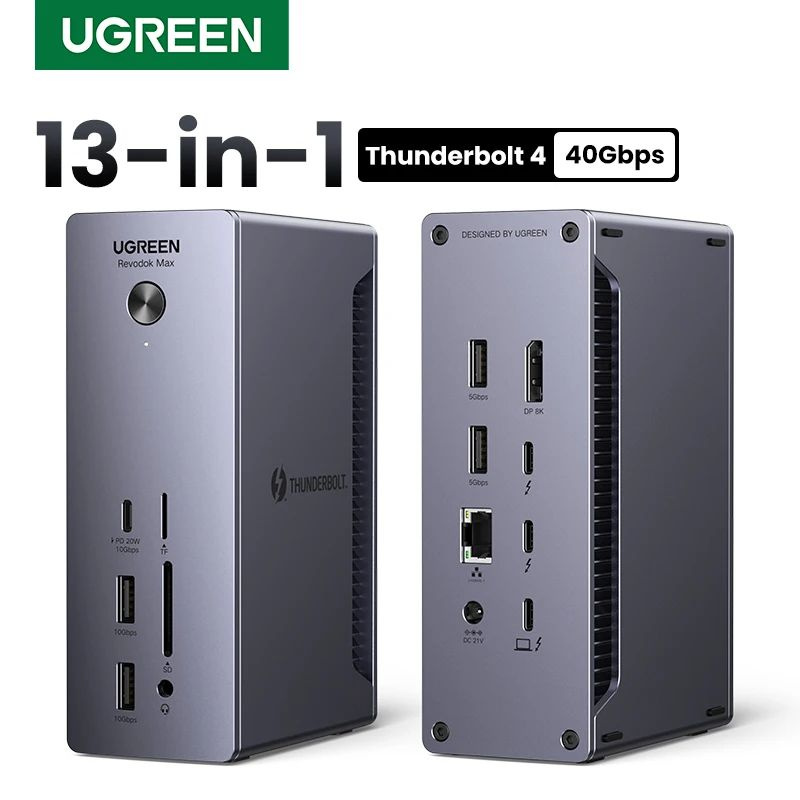
USB-концентратор
О товаре
Перейти к описанию
Тип
USB-концентратор
Количество выходных разъемов
13
Подключение концентратора
USB Type-C
Размеры, мм
147*94*50
Подходит для
27 498 ₽ 88 189 ₽
Магазин
Подписаться
CX
Перейти4.6
Чат
Заказы
8.8 K
О магазине
Часто задаваемые вопросы
Другие предложения от продавцов на Ozon Россия
Описание
UGREEN U710 Thunderbolt4 Док-станция 13-в-1 40Gbps Dual 4K 60Hz Single 8K 30Hz 90W зарядка 2 5GbE RJ45 SD TF 4 0 для MacBook Pro MaxAbout this item:
13-in-1 Massive Expansion
: The 13-in-1 Thunderbolt 4 Dock is equipped with 2 Thunderbolt 4(40Gbps, 15W), a DisplayPort 1.4, a 2.5GbE ethernet, SD & TF 4.0, a USB C 3.2(10Gbps, 20W), two USB A 3.2(10Gbps), two USB A 3.0, a 3.5mm audio, and a 180W DC power ports, which can meet all your high-performance expansion needs.
Powerful Thunderbolt 4
: With one upstream and two downstream Thunderbolt 4 ports, you can transfer data at speeds up to 40Gbps and display in resolutions up to 8K. Experience high-performance work like never before.
Dual 4K@60Hz or Single 8K Display
: The Thunderbolt 4 Docking station can extend two displays in up to 4K@60Hz or a single display in up to 8K@30Hz (macOS only supports 4K@60Hz). Greatly improve your work efficiency and display experience. (For Macbook, only Pro/Max version M-Chips & Intel chips support Dual Display Output)
90W High-speed Charging
: With the included 180W GaN charger, this Thunderbolt 4 dock can charge your laptop up to 90W while working. No need to connect another charger. (The dock must be connected to the charger to work)
Widely Compatible
: The Thunderbolt 4 Dock is compatible with most Thunderbolt 4, Thunderbolt 3, USB4, or USB-C computers or tablets, including Macbooks(macOS 11.4 & above), Windows laptops(Windows 10 & above), iPads, or other tablets with USB-C ports. (Full-function USB-C laptops and tablets only support single display. Not compatible with Mac mini 2018(intel). )
UGREEN
Thunderbolt 4 40Gbps
13-in-1 Docking Station
2 x 40Gbps Thunderbolt 4 Ports 13 Ports Expansion
8K@30Hz Single Display 4K@60Hz Dual Displays
10Gbps 1xUSB-C+2xUSB-A DP1.4 Ports
2500Mbps RJ45 180W DC Input 312MB/s. SD/TF 4.0 Slots
13-in-1 Massive Expansion
: The 13-in-1 Thunderbolt 4 Dock is equipped with 2 Thunderbolt 4(40Gbps, 15W), a DisplayPort 1.4, a 2.5GbE ethernet, SD & TF 4.0, a USB C 3.2(10Gbps, 20W), two USB A 3.2(10Gbps), two USB A 3.0, a 3.5mm audio, and a 180W DC power ports, which can meet all your high-performance expansion needs.
Powerful Thunderbolt 4
: With one upstream and two downstream Thunderbolt 4 ports, you can transfer data at speeds up to 40Gbps and display in resolutions up to 8K. Experience high-performance work like never before.
Dual 4K@60Hz or Single 8K Display
: The Thunderbolt 4 Docking station can extend two displays in up to 4K@60Hz or a single display in up to 8K@30Hz (macOS only supports 4K@60Hz). Greatly improve your work efficiency and display experience. (For Macbook, only Pro/Max version M-Chips & Intel chips support Dual Display Output)
90W High-speed Charging
: With the included 180W GaN charger, this Thunderbolt 4 dock can charge your laptop up to 90W while working. No need to connect another charger. (The dock must be connected to the charger to work)
Widely Compatible
: The Thunderbolt 4 Dock is compatible with most Thunderbolt 4, Thunderbolt 3, USB4, or USB-C computers or tablets, including Macbooks(macOS 11.4 & above), Windows laptops(Windows 10 & above), iPads, or other tablets with USB-C ports. (Full-function USB-C laptops and tablets only support single display. Not compatible with Mac mini 2018(intel). )
UGREEN
Thunderbolt 4 40Gbps
13-in-1 Docking Station
2 x 40Gbps Thunderbolt 4 Ports 13 Ports Expansion
8K@30Hz Single Display 4K@60Hz Dual Displays
10Gbps 1xUSB-C+2xUSB-A DP1.4 Ports
2500Mbps RJ45 180W DC Input 312MB/s. SD/TF 4.0 Slots


13-in-1 Massive Connectivity
Equipped with 2 Thunderbolt 4(40Gbps, 15W), a DisplayPort 1.4, a 2.5GbE ethernet, SD & TF 4.0, a USB C 3.2(10Gbps, 20W), two USB A 3.2(10Gbps), two USB A 3.0, a 3.5mm audio, and a 180W DC power ports, which can meet all your high-performance expansion needs.
Equipped with 2 Thunderbolt 4(40Gbps, 15W), a DisplayPort 1.4, a 2.5GbE ethernet, SD & TF 4.0, a USB C 3.2(10Gbps, 20W), two USB A 3.2(10Gbps), two USB A 3.0, a 3.5mm audio, and a 180W DC power ports, which can meet all your high-performance expansion needs.

Powerful Thunderbolt 4
With one upstream and two downstream Thunderbolt 4 ports, you can transfer data at speeds up to 40Gbps and display in resolutions up to 8K.
With one upstream and two downstream Thunderbolt 4 ports, you can transfer data at speeds up to 40Gbps and display in resolutions up to 8K.

90W High-Speed Charging
With the included 180W GaN charger, this Thunderbolt 4 dock can charge your laptop up to 90W while working. No need to connect another charger. (The dock must be connected to the charger to work)
With the included 180W GaN charger, this Thunderbolt 4 dock can charge your laptop up to 90W while working. No need to connect another charger. (The dock must be connected to the charger to work)

More Efficient with Dual Displays
8K@30Hz single display / 4K@60Hz dual displays
8K@30Hz single display / 4K@60Hz dual displays

Display What You Want
Multiple display modes for Windows & macOS
Multiple display modes for Windows & macOS

Dual 4K@60Hz Displays for macOS
* For Macbook, only the Pro/Max version M-Chips & Intel chips support Dual Display Output.
*The LG38WN95C monitor is not supported and may cause color cast issues.
* For Macbook, only the Pro/Max version M-Chips & Intel chips support Dual Display Output.
*The LG38WN95C monitor is not supported and may cause color cast issues.

Display Modes for Mac

Dual 4K@60Hz Displays for Windows

8K Single Display for Windows
* Macbook only supports 4K@60Hz in single display mode due to hardware limitations
* Macbook only supports 4K@60Hz in single display mode due to hardware limitations

Display Modes for Windows

Resolution List

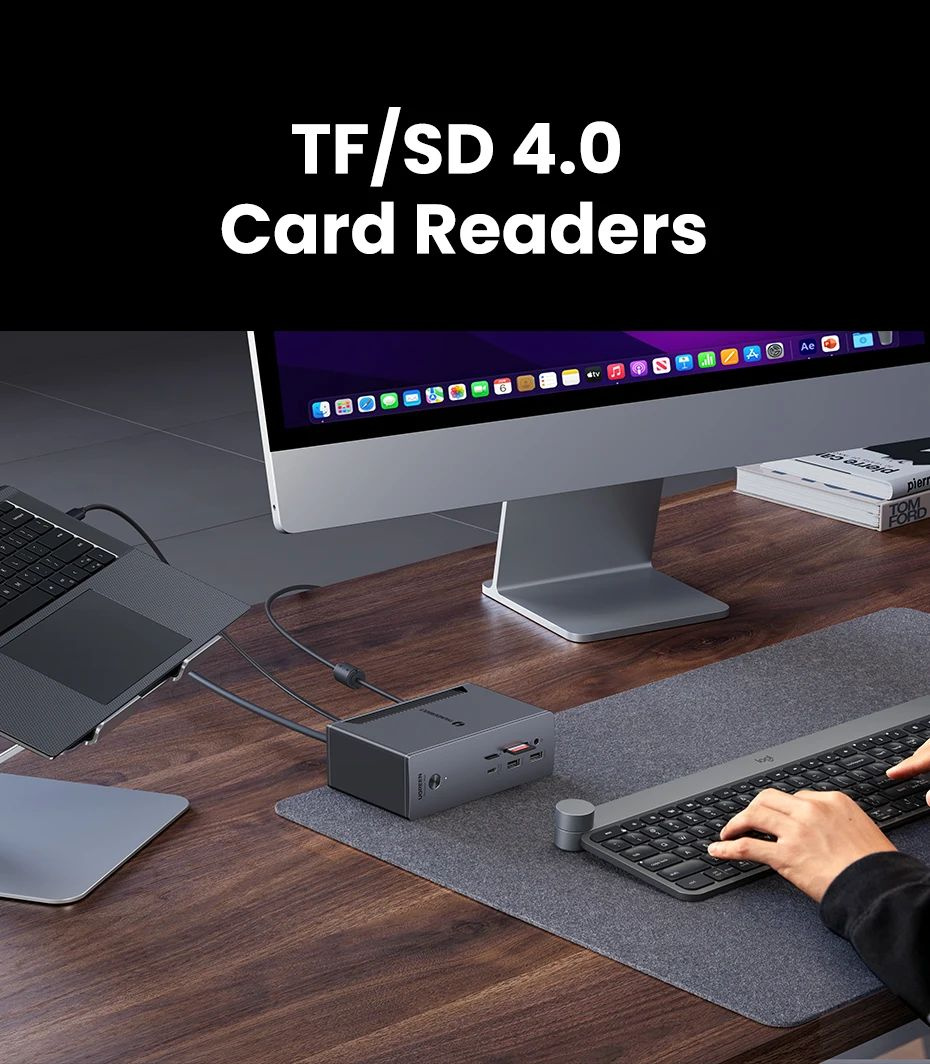
TF/SD 4.0 Card Readers
Read & write 2 cards simultaneously, the max speed up to 312MB/s.
Read & write 2 cards simultaneously, the max speed up to 312MB/s.
2.5Gbps Ethernet Port

Compatibility List (Partial)


For Video Editor
The Thunderbolt 4 dock supports powerful content creation. The dual 4K@60HZ display extended makes editing multiple video streams easier.
The Thunderbolt 4 dock supports powerful content creation. The dual 4K@60HZ display extended makes editing multiple video streams easier.

For Programmer
The Thunderbolt 4 dock turns a Thunderbolt port into a powerful workspace. You're ready to create, code, and collaborate.
The Thunderbolt 4 dock turns a Thunderbolt port into a powerful workspace. You're ready to create, code, and collaborate.

For Engineer
The Thunderbolt 4 dock has rich interfaces and powerful scalability. It allows you to process complex project files faster and more efficiently.
The Thunderbolt 4 dock has rich interfaces and powerful scalability. It allows you to process complex project files faster and more efficiently.

Upgraded Cooling System

What's in the Box

Q&A:
Q1:
Can this Thunderbolt 4 dock work without the charger?
A1:
No, You must connect the included 180W GaN charger for the dock to work.
Q2:
Why is there only one display work when two monitors are connected?
A2:
1) Only when the dock station is connected to a Thunderbolt 4/Thunderbolt 3 or USB 4 port can it support dual displays.
2) When a M1/M2/M3 Macbook or tablet or a full-function USB-C computer is connected, it only supports a single display.
Q3:
How many storage devices can I use at the same time?
A3:
If you use HDD, It's suggested to use up to 2 simultaneously, If you use SSD, It's suggested to use up to 3 simultaneously. Due to the overload protection mechanism, Using too many storage devices simultaneously may cause product work unstable.
Q4:
Why won't my Dock-connected keyboard wake up my Macbook when it sleeps?
A4:
When the Mac enters into sleep mode for more than two hours, you need to double-click instead of single-clicking any keys on the keyboard to wake it up.
Q5:
How to deal with a black screen and display flickering when connecting to an external monitor?
A5:
1) Please unplug and plug the Thunderbolt ports, and ensure there is an interval of more than 3 seconds.
2) Please try to lower the resolution and refresh rate.
3) Try another DP/Thunderbolt cable.
4) Restart the laptop.
UGREEN Warranty & Service
7 Days Return
Enjoy 7 days to return if any quality problems
48 Hours Delivery Time
Most items will be shipped within 48 hours
1-Year Warranty
All products have a 1-year warranty from our store
24 Hours Online Service
All emails will be answered within 24 hours
Q1:
Can this Thunderbolt 4 dock work without the charger?
A1:
No, You must connect the included 180W GaN charger for the dock to work.
Q2:
Why is there only one display work when two monitors are connected?
A2:
1) Only when the dock station is connected to a Thunderbolt 4/Thunderbolt 3 or USB 4 port can it support dual displays.
2) When a M1/M2/M3 Macbook or tablet or a full-function USB-C computer is connected, it only supports a single display.
Q3:
How many storage devices can I use at the same time?
A3:
If you use HDD, It's suggested to use up to 2 simultaneously, If you use SSD, It's suggested to use up to 3 simultaneously. Due to the overload protection mechanism, Using too many storage devices simultaneously may cause product work unstable.
Q4:
Why won't my Dock-connected keyboard wake up my Macbook when it sleeps?
A4:
When the Mac enters into sleep mode for more than two hours, you need to double-click instead of single-clicking any keys on the keyboard to wake it up.
Q5:
How to deal with a black screen and display flickering when connecting to an external monitor?
A5:
1) Please unplug and plug the Thunderbolt ports, and ensure there is an interval of more than 3 seconds.
2) Please try to lower the resolution and refresh rate.
3) Try another DP/Thunderbolt cable.
4) Restart the laptop.
UGREEN Warranty & Service
7 Days Return
Enjoy 7 days to return if any quality problems
48 Hours Delivery Time
Most items will be shipped within 48 hours
1-Year Warranty
All products have a 1-year warranty from our store
24 Hours Online Service
All emails will be answered within 24 hours
Комплектация
Адаптер DC180W + кабель Thunderbolt + гарантийный талон + руководство + коробка
- Артикул
- 2374764317
- Тип
- USB-концентратор
- Количество выходных разъемов
- 13
- Подключение концентратора
- USB Type-C
- Размеры, мм
- 147*94*50
- Страна-изготовитель
- Китай
- Цвет
- Серый металлик, светло-серый
- Интерфейсы
- HDMI, microUSB
- Основной материал корпуса
- Металл, Пластик, Титановый сплав
- Длина шнура, м
- 0.8
- Вес товара, г
- 795
- Единиц в одном товаре
- 1
- Гарантия
- 12 месяцев
- Подходит для:
- 3Q, 4Good, Acer, AEG, Alcatel, Apple, Archos, ASUS, BenQ, BlackBerry, Canon
- Электробезопасность:
- OCP (защита от перегрузки по току), OVP (защита от подачи повышенного напряжения), SCP (защита от короткого замыкания), UVP (защита от подачи пониженного напряжения), OTP (защита от перегрева), OPP (защита от перегрузки)
- Технологические особенности:
- Поддержка Ethernet-соединения (HDMI Ethernet Channel, HEC), Поддержка разрешения 4K, Поддержка разрешения 8K
- Конструктивные особенности:
- Витой кабель, Оплетка кабеля, Позолоченные коннекторы, Тканевая оплетка, Дисплей
Подборки товаров в категории USB-хабы и док-станции
Отзывы о товаре
2
USB-концентратор
Показать сначала:
новые и полезные
с высокой оценкой
5 / 5
Рейтинг формируется на основе актуальных отзывов
5 звёзд
2
4 звезды
0
3 звезды
0
2 звезды
0
1 звезда
0
Как правильно задавать вопросы?
Будьте вежливы и спрашивайте о товаре, на карточке которого вы находитесь
Если вы обнаружили ошибку в описанием товара, воспользуйтесь функцией
Как отвечать на вопросы?
Отвечать на вопросы могут клиенты, купившие товар, и официальные представители.
Выбрать «Лучший ответ» может только автор вопроса, если именно этот ответ ему помог.